Showing posts with label Mac. Show all posts

Monday, 3 January 2022

Drag and Drop behaviour has certainly changed in OSX Monterey 12.0.1

 The Drag and Drop behaviour has certainly changed in Monterey most noticeably in the "Grab and drop" actions.


Factors that demonstrate this issue are:

  • Using list or column view for folders - The select, drag and drop action works, in the same folder with same files when in Icon or preview view modes.
  • Using a trackpad does not work but a magic mouse does work. You can have both plugged in at the same time and see the different behaviours.
  • Accessibility options for pointer System preferences -> Accessibility -> Pointer control -> Trackpad options -> Enable Dragging
  • Drag to move action seems to be a bit intermittent, sometimes works sometimes not.


Note that under "Pointer control" there are sub options "Trackpad options" and Mouse Options but only under trackpad is there an option to Enable Dragging. The Enable dragging choice has With drag lock, Without drag lock and Three finger drag.

Setting The enable dragging choice to Three fingers just upsets Mission control Desktop management. Enable dragging with drag lock seems to work best.


Workaround

When using a trackpad in list or column mode, after selecting the files to move briefly push [alt] key to grab and move the files. The [alt] key will trigger the "copy files on move" action but if you release the alt before dropping the files the action reverts to a move rather than copy (when moving with in the same disk volume).


Other folks have reported that switching off force and Septic feedback fixes this behaviour.


Set the Trackpad option to enable dragging.


Mouse option


Context is Monterey on a Mac mini 2020 and seen on Mac book Air M1.

Friday, 5 November 2021

Synology NAS920+ A great device for the computing community

Update Aug 2025

Comments by NASCompares about Synology choosing to limit HDDs to own brand drives only.

And Ars Technica https://arstechnica.com/gadgets/2025/04/synology-could-bring-certified-drive-requirements-to-more-nas-devices/ 

The latest 2025 Devices require Synology branded drives ( made by Seagate with special firmware apparently)

------------------

Update Nov 2024 A couple of articles for further reading

Ars Technica : “Clearly predatory”: Western Digital sparks panic, anger for age-shaming HDDs"

Wired : Zero-Click Flaw Exposes Potentially Millions of Popular Storage Devices to Attack

The SynologyPhotos application package comes preinstalled and enabled by default on Synology’s line of BeeStation storage devices but is also a popular application downloaded by users of its DiskStation storage systems ...

--------------------

Remember - digital data can both last forever and be gone in a milli-second. The difference is backups and reliable storage devices.

This is a great NAS from Synology,  a company with a solid reputation and great support organisation.

Storage devices are as important as the main PC in any computing environment that has grown to more than a couple of PCs and devices. Ease of use and reliability are key for on-going satisfaction.

You can move data four main ways between a Mac and the device :

  • Up/down load using the File Station software accessed via a web browser,
  • Mount a shared folder and use the finder,
  • Mount a shared folder and use the command line in terminal.
  • Use Time Machine for backups.
Some things I found out along the set up journey:
Use SMB and not AFP for modern Macs.

TimeMachine the mainstay of Mac based backups can be used with with NAS. Shared folders must have the "discoverable by Bonjour" over SMB set on for the shared folder.

When first setting up using bfs be sure to a put in all the drives that will be used.  I started with two drives then added two more but it took the device about 12 hours each to weave the later drives into the existing configuration. This is a result of having to redo the on-disk data redundancy layout for the added drives. 

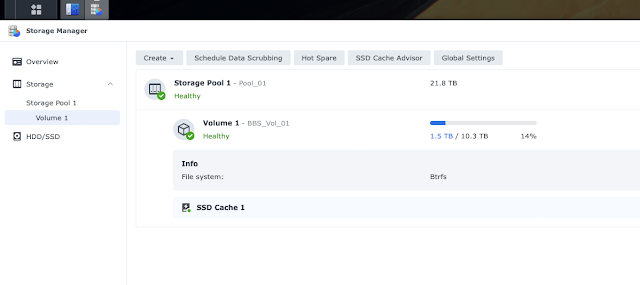
Use the same size drives if possible - I have 4 * 7TB drives that because of the redundancy scheme this provides 21 TB of storage and 1 drive failure redundancy.  Use proper NAS drives available from WD or Toshiba for best longevity.

Adding 2 * 1TB cache M1 ssd sticks helps performance when the load ramps up but I do suspect that write through to disk happens. Use at least gigabit wired networking, not wifi, for moving larger amounts of data. I was getting reliably about 100Mbytes/second writing from a MacBook Pro with ssd drive over a wired connection.  TimeMachine is a bit slower but not by much. For best performance and ease of use, when copying large quantities of small files, bundle your data into large chunks using disk images made by Disk Manager application. 


I was stuck for a while getting "Not enough space to copy file." messages on both Mac systems that were using the device. After a very pleasant interaction with Synology technical support they found a quota setting on the user name was being correctly enforced. I had forgotten that I had put this user storage quota on early in the testing process.  The support case opened and closed in the same day.

The disk manager software on the NAS has many options and can be extended with extra software. The fine grained controls over users and data access are great. This model has a Celeron processor and I suspect that the virtual machine experience may not be great. However for long term NAS usage lower power consumption is preferred.  Best of all the device and software are activity supported by a mature company with a long track record.

Let's talk about the noise.  In a silent office you can hear the device but it's not unpleasant. Being quieter than a coffee machine or someone tapping on a mobile phone. I imagine the NAS as a holding place for data chipmunks so the gentle activity noise is reassuring.  Some extra sound dampening would be good though esp. when the drives are spinning up. The device drive activity is not predictable when using Time Machine or multiple shared folders. 

I get the feeling that I have only scratched the surface of the features of this device but I have been very impressed so far. Overall a great device with the reassurance of an active support organisation, a very  worthwhile addition to my computer community.

Battery power in case of mains failure can be added with a UPS. When the UPS has a USB connection the Synology device can be configured with the control Panel -> Hardware -> UPS to shutdown automatically when the battery gets low.

See the range of Synology NAS devices here.

Comparative review with other NAS devices here.

I like this box.

Tuesday, 30 March 2010

Overclocking is the new hot-rodding

Back in the days when you could improve a car using a set of spanners and a trolly jack the craze for Hot rodding was all over the streets. These days the testosterone filled teens ( and other geeky enthusiasts) overclock their PCs instead. There are many similarities, both activities are all about getting the best performance from what starts as commodity equipment; both interests involve a combination of detailed information, home engineering, trial and error tuning, and of course those manly pursuits of bragging and racing.

The purchase of carefully selected bolt-on goodies from RipSpeed, Demon Tweeks has been replaced these days by Corsair and Zalman specialities. "Throwing a rod" has been replaced by a catastrophic meltdowns as the cost of getting it wrong. Unlike racing on the public road to compare performance, Lan parties and folding teams are where system performance are compared and debated.

My first overclock in 1992 was pushing a Mac IIsi from 20Mhz back to the 25Mhz the motherboard was designed for. A hardware hack described here. These days pushing cpu clocks from 2.8Ghz to over 5Ghz ( 5000Mhz) is not routine but possible.

The pattern for both hot rodding cars and overclocking PC follows the same levels, use stock parts, get the best replacement parts, swap out the weaker parts with reengineered parts, buy or build exotic replacement parts. Tweak tune and adjust at each level to get the best performance and discover the weakest link.

The common fascination of tweaking and tuning, pushing a set of carefully assembled kit up to and beyond the meltdown limit joins the hot rodder from previous generations to the PC overclocker of today.

Cheers

Gannett

Monday, 30 November 2009

TV evolves - the next moves

It's all change in the world of TV. The move to digital broadcasts has indeed been the catalyst for further changes and mutiple alternative delivery channels ( well over the internet ).

Having been one of the hard done by 2002 vintage Tivo fans in the UK who watched the USA incarnation move onward with features and functionality I have longed for some PVR catch up time. Well it's all happening now.

Having pioneered public free internet delivery of catch up missed TV on the Player service. The BBC is now making this great utility available on multiple platforms. The trailblazing video on demand catch-up service BBC iPlayer service moves out to Playstaion, Wii and soon Freesat HD.

Media centre software is a popular developer flavor, with Mac+FrontRow, Xbox+XBMC, PC + Media Centre as well as multi platform Plex all fighting for sofa based eye balls. Just having a player with codecs just doesn't cut it any more. The brilliance of the iPlayer is to brand the delivery player and not just the content. Where ever iPlayer turns up that's a dime to the BBC.

Tivo comes back to the UK as the set top box for Virgin Media. It is possible for a product to be launched both before and after the market window that Sky+ has saturated ? This may be a play for Virgin to break out of it's cabled getto. Get a great box out there and people will buy it for the service not just the wire it comes down.

The outsiders are Fetch TV service offers more than just iPlayer incorporating true video movies on demand into a set side box and UK Telco giant BT Vision TV on demand offering.

With PCs and Macs with humble USB sticks reaching for the airwaves along with YouTube going premium there is, as always, more TV than hours in the day.

Gannett

Saturday, 1 March 2008

The biggest file in Leopard, Alex's Voice

Update : Apr 2026 - Chrome now installing a 4GB LLM file by default. As described in this Register article. 

Update : Dec 2019 - Disk space visualisation program on mac is now called Grand Perspective and on PC WinDirStat

From 2008:
I was having a dig around looking for some space on the root file system using a rather great filesystem viewing tool called "Disk inventory X" and leaping out from the picture was a single 670MB file. This single file accounts for about 18% of the size of Leopard.

Tucked away in the Alex voice Speech library folder was the data definition for the new very smooth Alex voice. Do try it out using the System preferences -> Speech -> Alex just to hear how much an improvement the voice is over the previous very robotic attempts.

The techical details are ...

Macintosh: $ ls -l /System/Library/Speech/Voices/Alex.SpeechVoice/Contents/Resources/PCMWave
-rw-r--r-- 1 root wheel 701743856 24 Sep 02:06 /System/Library/Speech/Voices/Alex.SpeechVoice/Contents/Resources/PCMWave


The amusing bit is the file data type identifier at the start of the file which is
Macintosh:Resources $ od -c PCMWave | head
0000000
meow \0 001 \0 006 \0 \0 \0 0 002 303 Q 000

[Removing voice file instructions removed - May 2010]

This file was trimmed down for Snow Leopard which as a % of the size of HDs is not so bad.

Gannett

PS I later found this Blog entry of Billyoregon who previously discovered this file using the same technique.

Tuesday, 5 February 2008

Had a better week Mac wise

Defiantly had a better week last week and got a few long standing issues resolved.

Firstly I have a Mustek A3 USB Scanner that had been stuck on an old Mac G3 B&W. I Finally found a blog which guided the way to get the SANE drivers and files needed to get it up an running. Ok so the blog references a previous ( now defunct ) blog but thats was all I needed. See PJ Holdens blog. The scanner works OK on 150 dpi but scrubs on higher resolutions. Integrated into Photoshop CS as File -> Import -> SANE. Sorted.

Secondly Creating Disk Images on OSX for use as bundled backup files. Found the Application DropDMG at $20. Neatly packaged, command line options and quite configurable.

Also found the code hackable BuildDMG.pl perl module over at this location. It needed a bit of work, mostly to swap out /Developer/Tools/CpMac and replace it with /bin/cp that preserves special Mac file attributes from OSX 10.4 onwards. Find this bit in the perl an change to the following ...

# copy the files onto the dmg
# use /bin/cp rather than /Developer/Tools/CpMac Only works on OSx > 10.4.x and beyond
print "Copying files to $dest...\n";
print "> /bin/cp -R $files \"$dest\"\n" if $debug;
$output = `/bin/cp -R $files \"$dest\"`;
$err = $?;

Put the perl in /Applications/BuildDMG/BuildDMG.pl then you can create a script+crontab to build the images on demand and drop them on your backup drive. A kind of TimeCapsule if you like :-) Have not yet managed to figure out how to drive it for directories with spaces in the name yet.

Thirdly since installing Leopard I have been suffering panic on wake-up. Let the system drift off to deep sleep then 1 time in 4 it will system panic on wake up. Looks like a USB or IO stack and It's all documented on the support boards here but not really made much progress. The solution is not green, but sometimes you have to give something away to get what you want. In this case I wanted "no panics" so installed Folding_At_home and donated a CPU. The distributed science application has a small memory footprint and is niced down so gets out the way when you need the horsepower.

And finally found a really good Mac based uk Tivo file extractor. The Java based TySuite has gui & command line & web interfaces and will pull as MP2 ready for conversion to MP4/AVI. Not quite as convienet as TivoTool but is better on Leopard and can pull Mode 0 recorded files at 720 * 576.


Cheers

Gannett