Showing posts with label apple. Show all posts

Thursday, 22 October 2020

Apple computers and Cray Research - some notes

If you like this check out Cray-History.net

What are the Cray Research connections with Apple Computers ?

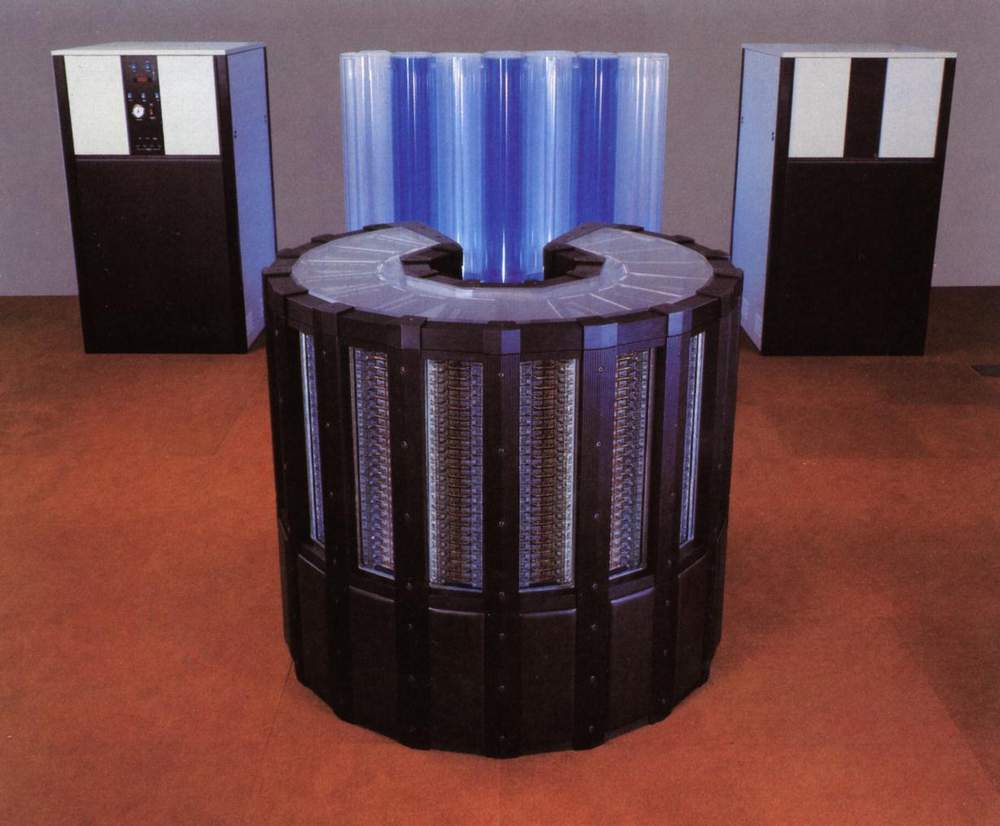
Cray XMP/48 with Apple SE inside
(c)1987 John Greenleigh

Cray Research and Apple Computers, seemly at opposite ends of the computer price spectrum, do have some subtle historical links. It is well known that Seymour Cray used an Apple desktop when designing Cray Computer Corp machines.  Macintosh computers where the desktop of choice and used almost exclusively whilst the company worked on the Cray-3 and Cray-4 projects. Much of the work was moving text and graphic files around a shared network.  "Seymour said he thought it was odd that Apple bought a Cray to design Macs because he was using Macs to design Crays. He sent me his designs for the Cray 3 in MacDraw on a floppy." reports KentK.

Apple Computer had a sequence of Cray machines starting in 1986 with an XMP/48 shown above followed by another XMP in Feb 1991. An upgrade to a Cray YMP-2E arrived later in 1991 and finally one of the smaller air-cooled Cray Y-MP EL from Dec '93 to Jun '98. 

Legend has that Apple's first XMP was bought by Steve Jobs after he walked into the Cray facility in Mendota Heights. However "Mike" a more reliable source relates ....

"The first machine installed at Apple was an X-MP/48 completed in August 1986. It had painted purple metallic columns and black power supplies. John Scully was the CEO, and he called the Western Region office in Pleasanton, Ca to get the salesman for his area of Cupertino, and his call was directed to Mike Wilhelm, the Western Region Manager, who after a lengthy conversation dispatched the salesman Bence Gerber, who sold the machine. I was standing at the receptionist desk who took John Scully's call when it came in, and got excited that Apple called us, and then went to Mike Wilhelm's secretary to hear what happened. I was also present for the installation, and spent many days covering the site."

According to a quote from MacObserver Website the timeline would indicate that John Scully was indeed in charge by install time.

"1985: Apple's board of directors authorizes John Sculley to remove Steve Jobs as executive VP and general manager of the faltering Macintosh division. Sculley, who genuinely liked Jobs, didn't act right away, hoping to make a smooth transition. Only after discovering Jobs' plan for a coup the following month did Sculley finally strip the founder of all operational responsibilities."

The Apple Cray machines were originally purchased to help out on a computer on a chip project and other engineering projects. Such projects included using the first Cray XMP as a Macintosh emulator for user interface design improvements. The site analyst reports ..

".. they sometimes ran the first XMP as a single user MacOS emulator ... They had a custom built frame buffer and a mouse hooked up to the IOP (Input/Output Processor).

Other applications were Computational Fluid Dynamics codes for disk drive head design improvement and complex chip and board logic proving tests. The Apple Cray machines eventually earned their keep running MOLDFLOW an injection plastic modelling program ( producing some results in the form of Quicktime movies) and later as a file server. 

Example of MOLDFLOW output


 T3d cube of cubes logo animated by changing the size of the surrounding balls.

What is less well known however is that the small active display panel on the front of the Cray T3D machines was an Apple powerbook. The powerbook ran a Macromedia presentation showing the T3D cube of cubes logo with an orbiting growing/shrinking sphere. The display at one site was changed to alternate with a presentation plaque display. It was rumoured that one site engineer ordered a collection of spare bits that, over time, comprised a complete new powerbook.

Cray T3D Tool Time Sales booklet showing the T3D with Powerbook generated logo front and centre (Scale T3D is aprox 2500mm tall) 
 

The Sept 1999 launch on the www.Apple.com web site of the G4 Macintosh computers displayed a YMP-8D computer on the processor details page. Whilst there was no direct reference to that particular machine there was a re-quote of the Seymour quote about "using an Apple to simulate the Cray-3" in a sidebar. The G4 was being touted as a "Supercomputer for the desktop" and with the performance figures of a Gigaflop/s (1 CPU) which is certainly up to at least 1992 supercomputer cpu speeds. The YMP pictured on the site would have had 0.333 Gflop/s per cpu but was sold as sustaining 1 Gflop/s, for the whole machine, on real life applications. Only comparable benchmarks would show if the Apple G4 could match the memory size, memory bandwidth and IO capacity the 8 year old Cray shown. There is however no doubt that the G4 would be cheaper to purchase than any machine from the Cray range.

The once popular Macintosh telnet communications program developed by NCSA (National Centre for Supercomputing Applications at the university of Illinois) in has an icon which is an Cray XMP surrounded by a network with Macs. NCSA had a Cray accessed by Macs and thus needed to develop such a program. 

One of those strange coincidences between Apple and Cray were problems using Perspex as a chassis material. Apple had problems with the Power PC G4 Cube machine as the corners were subject to cracking in some instances. Over at Cray the innovative total immersion cooling Cray 2 had cylindrical coolant reservoirs and cascades. After some time the coolant reservoirs tower material started to "craze" and fine cracks appeared. This was remediated by a new designed a new rectangular cascade that had a smaller footprint, was made of glass that solved the problem. 

Apple Power PC G4 Cube
(scale 180mm tall)

Early Cray-2 showing Cylindrical coolant reservoirs
(scale Cray-2 in foreground is 1200mm tall)

Cray-2 showing revised coolant reservoir 
( scale Cray-2 is 1200mm tall)


See other Cray historical notes at The Cray FAQ over at 0x07bell.net.

Further details in this article from Cray Channels 1987 (c)Cray Research Written by Kent Koeninger at or about the time of Apple's first Cray purchase.

Cray Research at Apple
computers

Cray Research at Apple
computers


Monday, 30 July 2012

Certificate errors with Safari, App Store, iTunes etc

Being in the tech support business I like to follow how technical issues are examined and resolved. With the advent of support forums this is often done in public where kind hearted techies try to assist general folks while the Ingnorarity whine "Vendor x should just fix this." or mutter vague unsubstantiated threats of "I will never buy Y again because of this issue."

The best type of issue to observe is the type with
  • Random and conflicting symptoms,
  • Tied to a "feature" introduced in some basic piece of infrastructure that everyone either ignores or just does not know about.
  • The failures can be bypassed but cause ongoing annoyance and concern.
Apple OSX is currently struggling with one such issue handling web site security certificates.  I have seen this one myself on an up to date MacBook Pro laptop.  Websites that need to be trusted (banking, paypal etc) barf certificate error messages and the AppStore gives "Connection error" when trying to update software even though iTunes store logs in correctly with the same AppleID. 

Some background information on Website certificates

Website certificates are part of the trust mechanism that tries to ensure that the website your talking to is the actual website and when talking to that secure website, no one snooping can see what your talking about.  Without going too deep on this, trust certificates are built into programs and websites which are then used to set up and validate secure end to end connections. Most peoples experience of these infrastructure operations extends to seeing the "S" in a secure web address such as httpS://www.xyz.com.   See this for yourself go to www.ebay.com and click login. The webpage address at the top of the page changes to https://signin.ebay.com/... In the background an encrypted secure SSL connection is set up and used to pass the login details and password to the website using encryption.  Anyone listening into your data conversations would see the connection to the websites being made but are not be able to read the user names and password as they are passed to the website.

The SSL connection and website certificates mechanisms are based on a public/private key crypto system. This system works on the basis that if you encrypt information using a publicly available key, that information cannot then be decoded unless you have the private key. The public keys are distributed freely to programs that need to send information but the private "Decode" keys are held safe at the receiving organisation.  Anyone intercepting the message may know the public key and the encoding mechanism but will not be able to read the message without the companies private key.  Think of a special padlock with two keys. One key can only lock the padlock and the other can unlock.  The padlock and the locking key is freely distributed but the unlock key is held securely.  Using this special padlock, goods can be secured in transit.  The trust certificates ensure that your are getting the public key from the correct organisation and not another pretending to be the receiving organisation.

Part of the trust certificate system is a mechanism to revoke and cancel certificates that have been stolen or broken.  Amazingly this revocation system was not implemented in some operating systems certificate handling code until recently.  Full use of both certificates and the revocation mechanism has long been a requirement of even mildly secure internet security protocols.  Recent break-ins to organisations that really should know better has reenforced the need for both secure certificates and a revocation mechanism.  Read more about CRLs and OCSP to get a view on how some of this technology works.

Apple's certificate problem

When browsing and trying to login to sites that use the above httpS mechanism would sometimes get an error message similar to "This certificate was signed by an untrusted user." Looking at the Safari activity window a similar message is seen.  In this example the site certificate https://www.paypalobjects.com/ that was issued by Verisign does not work correctly. The web page behind showed with the correct details from Paypal but the graphics from  www.paypalobjects.com missing.


This problem also shows up when using the Appstore to get software updates.  After selecting an update, an Apple_ID login box appears. Logging in using the same credentials that work correctly for iTunes gives the cryptic error message "Connection failed."  The problem seems to have first shown up in the recent OSX  10.7.4 update.

This is a type insidious error that causes a loss of trust in both the platform being used and the apparent "security" of the internet for Mac users. Having to bypass bogus certificate errors on a regular basis trains users to ignore the unusual and vastly increases the chances of accepting a hostile or correctly revoked certificate.

Looking at the Apple forum entries on this issue, amongst the normal forum noise and confusion, the following suggestions can be seen:

This is a system clock issue: True, if set a long way out, can cause certificate to appear as expired when they are not. This does not cover the "invalid issuer" messages that are at the heart of the issue.

This is an ocspd issue:  Kind of in the right area, it is a certificates problem. However the suggestion that followed to change the preferences in Keychain application to switch off the certificate revocation mechanisms CRL and OCSP. This is madness do not do this.  This is the sort of Doh! advice that goes alongside "Never forget where your car keys are by leaving them in the car."


The normal setting for the above items are "Best Attempt".

What fixed it for me

Looking down the posts the following entries by Apple forum user quickSti
fixed it for me and others. It did take about 10 minutes poking into the unfamilier Keychain application but has fixed the web site certificate ( invalid issuer )  error and I can now login to the AppStore.

Good Job quickSti.

quickSti
I solved this on my wife's computer by resetting the security certificate settings.  This might help others:
Close all (Safari) windows.

Application -> Utilities -> Keychain Access ->  click on System Roots on the left, and then click on Certifcates on the bottom left.

Check to see if any of the certificates on the right have the blue "+" symbol - this means they have custom trust settings.
There is a bug in changing the policies, so you'll have to change them via the method below. Changing them just by changing the access to "system defaults" doesn't seem to save.  The method below worked for me.


Double-click on each certificate with the custom setting (blue "+"), expand the section labled "trust".  Change the "Secure Sockets Layer (SSL)" setting to "no value specified".  Close window - you should be prompted for the password.  Double-click on the certificate again, expand trust, change the "When using this certificate" setting to "Use System Defaults".  Close window, and re-enter password.

If you didn't re-enter your password upon closing the window, the setting didn't take.  The blue "+" should disappear after a few seconds when it's set back to default.  Once all of the certificates are changed back to default, restart Safari.

This solved all of the problems for my wife's computer with these issues and OSX 10.7.4

This Explanation expanded on the solution

This worked for me.  It's ingenious since there was some kind of bug with the 10.7.4 update and it caused certain certificates to change their trust values or not register them properly in Keychain Access.  This method below has you change a certificate's trust value, save it, then change all the certificate's trust values back to default as it should be.  This solved my problem and my father can use his banking websites on Safari again.  However, it does take some time to enter and re-enter the admin password again and again for over 20 certificates.  Good luck and thank you for the advice.


There you have it, an ugly infrastructure bug that impacts normal web operations in an annoying and trust reducing way. A few red herrings seen on the journey to resolution. For sure this is not full root cause but enough for most folks to get by.  There are other similar looking error messages so please take care to ensure that what your seeing is the same if you expect the same solution to work for you.  


Finally remember to capture a screen shot using Grab or similar. When working with technical support folks, showing what you see is far more compelling than a vague description of a half remembered message.


Cheers


Gannett